How to Use Flexible Stays to Fill Calendar Gaps and Earn More
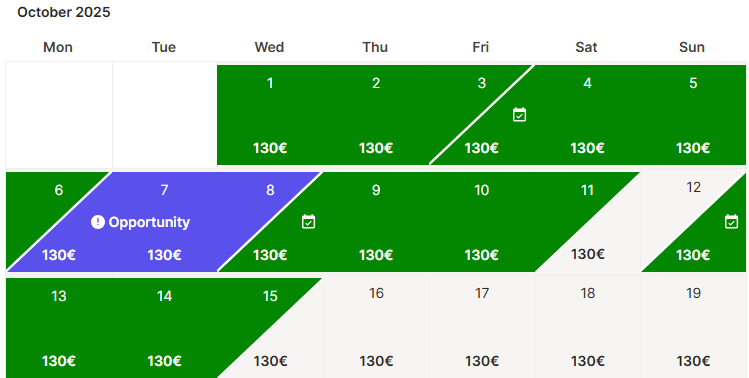
Holidu's Flexible Stays feature lets you open up bookable nights between existing reservations. These gaps appear in purple on your calendar and are usually unbookable because of your minimum-stay rules or fixed check-in and check-out days. Activating Flexible Stays makes those nights available to guests without changing your standard settings, so you can capture short-stay demand you would otherwise miss.
What Are Flexible Stays?
Flexible Stays is a Holidu feature that turns short gaps between bookings into bookable nights. Instead of leaving a one- or two-night gap empty, you can offer those nights to guests who only need a short stay. You stay in control of the price, the minimum stay length, and the option to turn the feature off at any time.
How to Activate Flexible Stays
You can activate Flexible Stays from either the Discounts section or the Calendar section. Both paths lead to the same result. Log in to your Holidu account and select the property you want to update, then follow the steps below.
Step 1: Open the Discounts Section
- Go to "Configuration" on the left-hand side of the page.
- Scroll down and click on "Discounts".
Step 2: Configure Gap Filling
- Scroll to the bottom of the page and find the option "Fill short gaps between reservations".
- Click on "Configure".
Step 3: Choose Your Rules and Activate
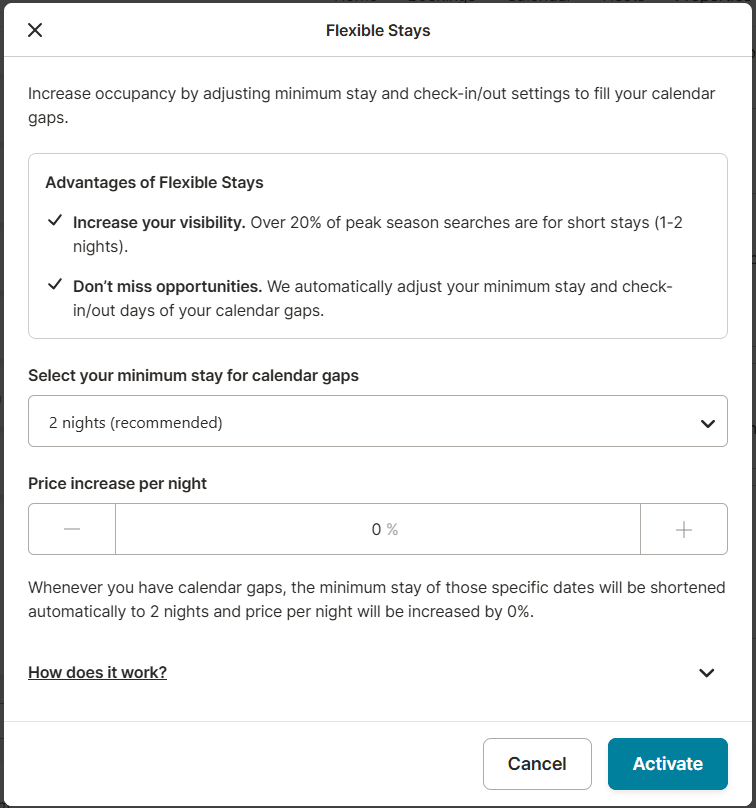
- Select a minimum stay of 1, 2, or 3 nights for the gap period.
- Choose a price increase of up to 50% over the price per night you currently set.
- Click "Activate" to confirm your configuration.
What Are the Benefits for You?
- More bookings: Short-stay nights become bookable during high-demand periods.
- Better visibility: Over 20% of peak-season searches are for short stays, so your property can appear to more guests.
- More reviews: Every additional booking is another chance to collect guest feedback.
- Higher ranking potential: Bookable gaps can support your performance in search results.
- Less manual work: You do not need to adjust your calendar by hand for each gap.
Things to Keep in Mind
- The feature only affects calendar gaps where your current settings do not allow bookings.
- This setting overrides your current minimum-stay and short-stay rules for those gap nights.
- Check-in and check-out are possible on any day for these special nights.
- If a booking is made, the special pricing and stay rules apply only to that period.
- Flexible Stay bookings appear tagged in your calendar so you can identify them easily.
- You can deactivate the feature at any time from the same menu.
Frequently Asked Questions
Can I exclude certain dates?
Not yet. Activating Flexible Stays applies to all gap nights that match your settings. If you do not want to open certain dates, you can manually block them in your calendar.
Can I change the setting later?
Yes. You can update the minimum stay, the price increase, or disable Flexible Stays at any time from the Discounts section.
Do you want to contact us?
We’re here to help. You can contact us directly if you need assistance or have questions.
Contact us